Showing posts with label gadgets. Show all posts

Thursday, June 11, 2020

Mi laptop to launch on June 11 2020 in India: Xiaomi is ready to enter the laptop market in India on 11 june 2020. The new Mi Notebook lunch in india on June 11, at 12 noon. This is an online event and will be streamed on Xiaomi’s YouTube and social media channels. Rumours was that the upcoming Mi laptop will be similar  to versions of the RedmiBook 14 that’s available in China only presently. but according to Xiaomi confirmation that June 11 will be a global launch of this laptop his means India will be the first to get this version of Mi Notebook.


specifications and price  coming soon
Read More

Monday, August 5, 2013

UFSx + HWK Setup v02.03.00.00 is Official Released. This latest update of UFSx and HWK support few new devices see the list provided below:
Download latest UFSx + HWK Setup v02.03.00.00


DCTxBB5 v2.3.0.0
  • BB5 RAPU Based Products USB Flashing / UI support added: RM-754 (801T)
  • DCT4 INFINEON Based Products USB Flashing / UI support added: RM-694,RM-761,RM-799,RM-800 (X2-02,200,201,201.1)

LG_GSM v2.3.0.0

  • Infineon Egold Boot Fixed (was broken in v 2.2.0.3)
  • Infineon E500,KM553,KM555,KM555e,KM555g,KM555R added (FL,CUL)
  • Infineon GT370,GU230GO,S367 added (FL,CUL,DUL,IM)
  • Infineon T370,T375,T385,T385b,T395,T500GO,T505GO,T565,
  • T565b,T575 added (FL,DUL)
  • MTK: A290 added (FL,3xIM)
  • MTK: USB Support for UI Functions (Select COM on Phone)
  • WiFi MAC Address Write Added for Infineon and MTK platforms.
SAMs v2.2.0.3
  • SWIFT
  • T456-FIDO,T456-ROGERS added (UNL,SECT,IM,FL)
  • SWIFT-AEROFONE
  • [Patch MSL] fixed for DUOS Products.
  • E1086W,E1153i,E1182-CHN,E1195L,E1200,E1200M,E1200M-CHN,
  • E1200T,E1202,E1205,E1205L,E1205M-CHN,E1205T,E1207,E1207T-IND,
  • E1207-MEA,E1220T,E1230T,E1232B,E1232D added (PUNL,PIM,FL)
  • C3520,C3780,C3782,E2250,E2252 added (UNL,SECT,IM,FL)
  • E2220,E2222L (UNL,SECT,IM)
  • SWIFT-3G
  • C3630,C5190,C5530,E3217B,E3217L,S5270K,S5270L,S568 0 
  • added (UNL,SECT,FL)
  • C5010,E3210,E3213,S5610 Direct Unlock Fixed.
  • IMEI Repair Added for Almost All Models:
  • C3630,E2310,E2313,S3710,S5270,S5610,..
  • INFINEON
  • C3310,C3310R,C3312,C3312R,C3313K,C3330,C3332,C3350 ,C3350M,
  • E2230L,E2350B,E2600,E2600M,S3800,S3802,S3802W,S522 0,S5220R,
  • S5222,S5222R,S5229,S5292,S5296 added (CUNL,PUNL,PIM,FL,UFL)
  • E1151 Missing boot fixed.
  • E1151 IMEI Rebuild and Direct Unlock added (AT Mode)
  • Note: Need make Boot Mode Info before use of AT Mode.
  • QUALCOMM
  • M210S,T356 Added.
  • BROADCOM
  • S5380B,S5380D,S5380F,S5380G,S5780D,S7250,S7250D added (UFL)
Download:

Official: sarunasoftware

Or

UFSx Support Suite : UFSx + HWK Setup v02.03.00.00

Installation:
  • Uninstall ALL previous versions, you MUST uninstallHWK Suite BEFORE trying to uninstall HWK Support Suite Setup.
  • Install UFSx Support Suite Setup
  • Connect your UFSx+HWK before running the UFSx Control Panel
  • Run UFSx Control Panel
  • Select the "Hardware" Tab
  • If you only have one UFSx connected it will be selected, if more than one, select the check box next to the required UFSx. You can click "Scan Boxes" to refresh the list if you have connected further boxes since opening the Control Panel
  • Click "Check Box"
  • Click "Update Box"
  • Click "Check Box"
  • Select the "Software" Tab
  • Amend "Application Install Path" and/or Nokia InstallPath, if required.
  • Click "Check Server"
  • Click "Install"
Enjoy..............
Read More

Saturday, February 2, 2013

Hi here we are going to provide an installation instruction EVO-X3 Custom Rom on Galaxy y. As in our previous installation guide we have already shown how to install EVO-X2 Custom Rom on Galaxy y and update it to version v2.1 .Now the developer team of Evolution-x Custom Rom for galaxy y has released its latest version known as evo-x 3. This Rom is shared on XDA by Senior Member b16h22 so don't forget to thanks him if you like his work. so before preceding to the installation instruction of this latest version of evo-x 3 custom Rom on galaxy y lets have look on added features and screenshots (by dev.) of evo-x 3 rom running on galaxy y.

Screenshots:


 Changelog evo-x3
  • Revamped UI
  • Removed Kernel
  • Some useful apps added
  • And some more.
Warnings:
This Custom Rom is only meant for Samsung galaxy y model gt-s5360. Use it at your own Risk we will not be held responsible for any damage happens your device. This information is provided only for instructional and educational purpose.


Requirement:
A rooted galaxy y running on Stock Rom.
Rom File: (not mirrored) evolution-x3.zip
Size:88.79 MB
Cwm:cwm.zip

Installation Instruction:
  • First of all backup your system and Charge battery full.
  • Download and place all the files cwm and evolution-x3.zip in the root directory of yours phone sd card and turn off your phone.
  • Now reboot in Recovery mode by pressing Volume up + Menu + power button together.
  • When you enter recovery mode touchscreen will become function less so use volume up and down to move up and down menu as selection and power button as back.
  • Now from recovery mode menu select " Apply update from sdcard" and select clockworkmod recovery file "CWM.zip" after you enter CWM Recovery 
  • Do Wipe data/factory reset and wipe cache partition.
  • Then in recovery mode select Install zip From SDcard. 
  • Then select Choose Zip from SDCARD navigate to root directory and select the ROM file "evolution-x3.zip" file then wait for the installation to be completed.
  • After installation completes choose advanced and then reboot recovery option this will reboot your phone back in stock recovery mode here do data wipe and cache and reboot.
Congratulation! you have learn how to install evolution-x3.zip rom on Samsung Galaxy Y S5360. In case you notice bug post on thread page so developer may fix it.
To receive latest update from us like our facebook page Techween


Read More

Sunday, January 27, 2013


Firefox os is a Mozilla's mobile operating system. The web browser Firefox maker Mozilla unveiled Keon and Peak smartphones with Firefox OS. This smartphones is developed by Mozilla in partnership with Spanish phone manufacturer Geeksphone and telecommunications provider Telefonica. Presently this phones are Developer preview hope to be available in February.

Mozilla smartphone Keon      Mozilla smartphone Peak
This two models Keon and Peak comes with different hardware specification where keon is featured with small 3.5-inch screen, 3 MP Camera, 1 GHz processor, 4 GB storage and 512 MB RAM, which can be considered as a low budget phone.The next is peak it is a better smartphone with good features like 4.3″ qHD IPS Multitouch screen, Dual-core 1.2GHz Snapdragon S4 processor, 8 MP rear camera and 2 MP front camera, 4 GB storage and 512 MB RAM.

Mozilla has not confirm the release date of this devices but hope to be released in February. But they have announced Firefox OS App Days which will be held in this week where developers can participate and learn about Firefox OS and developing its applications.

So, we may hope to soon have Mozilla's Firefox OS based phones in market along with Android, iOS,windows and Symbian based smartphones.
Read More

Wednesday, January 16, 2013

Hi Friends here we are going to provide you an instruction on how to Flash Samsung Galaxy Y with Stock Firmware using ODIN. So follow the instruction and successfully Flash Samsung Galaxy Y with ODIN.

Requirement:
A Galaxy y model gt-s5360.
A computer running on windows xp, vista or seven with proper USB driver installed to connect your phone to computer (Get USB Driver for Samsung Galaxy Y HERE )
Stock Rom file: Stock Rom ( S5360_DXLF2_OLBLG1_DXLF1_wipe_by_SplitFUS2.zip )
Size:120.5 MB
ODIN:Odin3-v1.85.zip

Instruction:

  • Charge your phone battery full.
  • First of all Download the required file ODIN AND Stock Rom file and place it in a folder on your desktop.
  • Now you have two files in your folder extract both with any file extractor.

  1. Odin3-v1.85.zip
  2. S5360_DXLF2_OLBLG1_DXLF1_wipe_by_SplitFUS2.zip (file which contains the stock rom i.e 2.3.6 )

  • Now turn your Samsung Galaxy Y off ( Remove the battery for few seconds and insert it back)
  • Press Volume down + Home + Power to boot in Download Mode see video below.
  • Now you enter Download mode select continue by pressing Volume up button.
  • Now connect your phone to computer via USB cable.
  • Now on computer open Odin3 v1.85.exe
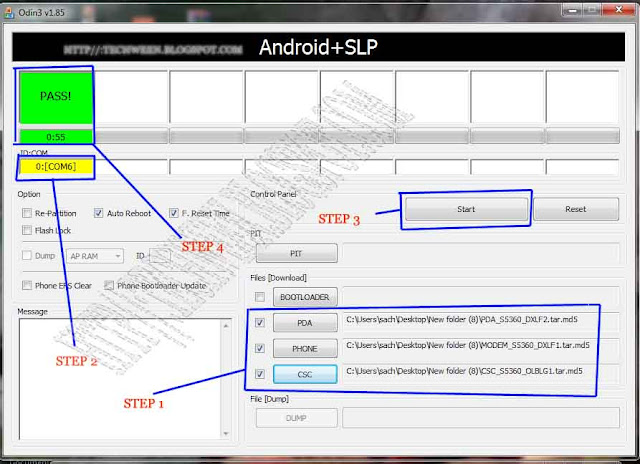
  • Now extract Stock Rom file inside you will get three files PDA_S5360_DXLF2.tar, MODEM_S5360_DXLF1.tar and CSC_S5360_OLBLG1.tar
  • Now in File[download] section of ODIN Browse the 3 tar files accordingly
  1. PDA=PDA_S5360_DXLF2.tar
  2. PHONE=MODEM_S5360_DXLF1.tar
  3. CSC=CSC_S5360_OLBLG1.tar
  • PIT and BOOTLOADER files not required - leave it blank.
  • Leave all other fields and check boxes default as shown in picture below.
  • Now make sure you are getting yellow box in ID:COM (this means that your device is now connected and detected by odin)
  • Now click on start.
  • Now let ODIN do its work and wait till you see PASS in green colour it mean the flashing process is complete successfully. Samsung Galaxy Y will auto reboot.

Congratulation you have learned how to Flash Samsung Galaxy Y with Stock Firmware using ODIN. Source xda


Read More

Friday, October 19, 2012


ZYBO3 ROM v1.0 for samsung galaxy y This rom is Deodexed ROM. created by member of XDAjerryn70 So thanks him if you like his work

Screenshot:


Features:
  • Rooted with restored warranty
  • Latest DDLE1 Indian firmware
  • Lidroid 14 toggles Status Bar
  • Swipe to remove notification
  • Deodexed
  • Zipalign
  • DSP Manager

Download:
Rom:(not mirrored)stockrom ddle1_galaxy y.zip

Installation Instructions:
  • Download all the zip files to SD Card (not in any folder).
  • Boot your phone in CWM Recovery.
  • Wipe data & Cache Partition.
  • Select Install zip from sdcard> Choose zip from sdcard.
  • Select DDLE1_GalaxyY.zip
  • Select Yes-Install DDLE1
  • Flashing will start and may take 10 minutes to be completed.
  • When you get message Install from sdcard complete, select reboot system now.
  • Phone will restart and first boot may take upto 10 minutes.

Zybo3 ROM successfully flashed!
Read More

Saturday, September 22, 2012

Specification and price of Sony Xperia Tipo and Sony Xperia Tipo Dual. Recently Sony has added a new excellent product in its Xperia series know as Sony Xperia Tipo and Sony Xperia Tipo Dual. The price of the phone is not to high and almost affordable. This both smartphone is powered with 800 MHz Qualcomm Scorpion processor, Runs on Android v4.0 (Ice Cream Sandwich) has an internal memory of 2.5GB, expandable up to 32GB. The Sony Xperia Tipo and Sony Xperia Tipo Dual have 512 MB RAM. and a 3.2-inch HVGA, 320 x 480 Pixels TFT display with Scratch-resistant, Handwriting Recognition, Gesture Support Display Features It has 3.2 megapixel rear camera and a Li-Ion, 1500 mAh battery.


Specification of Sony Xperia Tipo and Sony Xperia Tipo Dual


Sony Xperia Tipo
Sony Xperia Tipo Dual 
SimSingleDual
Video Messaging

Form FactorBarBar
NetworkGsm 2g / 3gGsm + Gsm 2g / 3g
Display3.2 Inches
262 K Colour TFT
3.2 Inches
262 K Colour TFT
ResolutionHVGA, 320 x 480 Pixels
HVGA, 320 x 480 Pixels
Operating SystemAndroid v4 (Ice Cream Sandwich)Android v4 (Ice Cream Sandwich)
Battery1500 mAh, Li-Ion1500 mAh, Li-Ion
Processor800 MHz Qualcomm Scorpion800 MHz Qualcomm Scorpion
GraphicAdreno 200Adreno 200
Memory512 MB RAM 
512 MB RAM

StorageInternal:2.5 GB
Expandable microSD, upto 32 GB
Internal:2.5 GB
Expandable microSD, upto 32 GB
CameraRear Yes, 3.2 Megapixel
Front No
Rear Yes, 3.2 Megapixel
Front No
Gps Yes, A-GPS with Google MapsYes, A-GPS with Google Maps
ConnectivityWi-fi, blue-tooth, A -gps, usb 2.0
 Tethering: USB and Wi-fi Hotspot
Wi-fi, blue-tooth, A -gps, usb 2.0
 Tethering: USB and Wi-fi Hotspot
Music PlayerYes, Supports MP3, WAV, eAAC+, MIDIYes, Supports MP3, WAV, eAAC+
Vedio PlayerYes, Supports MP4, H.263, H.264, WMV, 3GPPYes, Supports MP4, 3GPP, H.264, WMV, H.263
SensorAccelerometer, Proximity Sensor, CompassAccelerometer, Proximity Sensor, Compass
Application
Facebook, Google, Google Talk, YouTube, Twitter etc.
Weight162 g162 g

The price of Sony Xperia Tipo is around Rs. 9500 approx Sony Xperia Tipo is around Rs. 10300 approx in India.

Buy Sony Xperia Tipo (Classic Black) from Flipkart.com
Buy Sony Xperia Tipo Dual (Classic Silver) from Flipkart.com

I try my best in-spite of that if any thing incorrect or incomplete let me know
Read More

Tuesday, June 5, 2012

Tutorial to install new Rom on galaxy fit GT s5670 to achieve features and look of Xperia Play. This update based on xperia play with better performance to play games.This is Cyanogenmod 7 (CM7) ROM which is further modified to make its look almost like Sony Xperia play Stock Mod and Scripts are added for better performance. So lets take look on the features of the Xperia gamers edition Rom for galaxy fit GT s5670.


Features of gamers edition rom :-

  • Modified Kernel For Best Performance During Game Play.
  • Scripts Added For Performance Improvements
  • Original Boot Animation of Sony Xperia
  • New Drawer Animation.
  • Bareboned (100 MB).
  • TimeScape Resized to HDPI.
  • Removed DSP Manager.
  • Xperia Launcher from Stock ROM of Xperia X10 Mini.
  • Added xLOUD & Beats Audio.
  • more than 800 mhz processor.
Steps for updating galaxy fit GT s5670:-
  • Before updating backup all your dates, files, contacts and sms.
  • We will not be responsible if you brick your phone try at your own risk.
Requirements:-
  • galaxy fit mobile
  • Files
            1)     odin + ops file
            2)     xperia gamer’z edition rom.
            3)      google apps.

Extract the odin + ops file on pc and choose below file:-

  • ops -beni_v1.0.ops
  • check on one package
  • one package -cwm5
  • Then put your phone in download mode by long pressing = volume down + home key + lock key together.
  • Connect your phone to your pc & hit the start button & wait until rebooting.
  • The put your phone in recovery mode by long pressing = home key + lock key & choose below files. use volume keys to move up or down and home key to choose. To get back press lock button.

  1. Choose data wipe – select yes wipe date
  2. Choose wipe cache – select yes wipe cache
  3. Choose zip from sd card and install ”Xperia gamer's edition”
  4. Choose zip from sd card and install ” Google apps”
  5. Choose data wipe – select yes wipe data.
  6. Choose reboot system and wait until reboot.
  7. It will takes 5 to 10 minutes and reboot.
Downloads:

Read More
Related Posts Plugin for WordPress, Blogger...
Google Google+