Showing posts with label Android apps. Show all posts

Friday, July 24, 2020

How to record slow motion video with xiaomi redmi mi 4 and mi 4x,  NO ROOT, or unlock boot loader require just install app and ready to go, not tried on other models like mi 4A.
Hi friends now a days most of the smart phones comes with slow motion recording and Time lapse But here i am talking about Mi Redmi 4 it has time lapse option to record video but can not record slow motion so i tried many apps but cannot successfully record slow motion video with my Redmi 4 but today while going through internet i found a mod MIUI CAMERA that can record slow motion video on Redmi 4. So Thanks to the creator of this app if i get proper create link will add here. The only thing is that we can record in SD 480p, 30fps  and not working at HD 720p and FHD 1080p.

SO HERE IS SCREEN SHOT OF INBUILT CAM SCREEN AND THE MOD MIUI CAMERA 


How to install

To install this app we do not require to root or unlock boot loader you need to download the apk and simply install but slow motion only record 480p sd no HD and FHD

i will add my YouTube link here , i explain the whole process on Time Lapse and slow motion recording on mi smartphone
 
Download Here

Read More

Thursday, September 28, 2017

Amazon App Treasure Hunt 2017 on september 28 and 29 , Amazon India Is back again with much awaited and Popular Treasure Hunt. Hi friends if you want to win something free this festive season here is a chance for you to try your luck as we know that Amazon Indian organizes Treasure Hunts twice in a year an this time it is staring on 28 sep 2017, where you have to find the correct products from clues provided in Questions and have to claim it before other user claim it, and you will get the products for free If you are first one to claim it.

Date and Time of Amazon App Treasure Hunt :
Amazon India  has announced  App Treasure Hunt will be live On 28 /9/ 2017 from 3 pm to 6 and after every 15 minutes you get a new clue and 29/9/2017 on 28 September it will be home & kitchen related products and on 29th September Luxury Beauty & Personal Care Products to be own

How to participate in Amazon App Treasure Hunt
      As this is an app exclusive contest so you have to play it on app in your smartphones, So if you don't have Amazon app download from Google play for android devices and from app store for apple devices after  open the app and login  there you will see Amazon App Treasure Hunt” Banner to enter the contest click on banner at right time that is from 3 pm to 6 pm within this period after every 15 minutes there will be new Clue Questions related to Products ,You have to solve it as quick as possible and  find the Right product if you find  and claim the product first then other users you are lucky to take the product free Just for RS 0.00. after claiming checkout it as fast as possible that it you got free product from Amazon

You can also play Amazon app jackpot here 


Ans for 3 PM-

Blockbuster Clue: My job is to ensure that the stream is pure
Answer: Livpure Glo 7-Litre RO + UV + Mineralizer Water Purifier (White)

Clue : A red & yellow wrap & mat for the beach
Answer : Atrium 4 Piece 450 GSM Cotton Towel Set – Red and Gold

Ans for 3:15 PM-
Clue : Wet & unclean but keeps things spick & span.
Answer : Scotch-Brite Easy Sweeper Mop with Free Dry (30 Pcs) and Wet (8 Pcs) Cleaning Sheets

Ans for 3:30 PM-
Clue: How I wonder what you are – Sanjeev, Tarla, Vikas
Answer: Wonderchef Ceramide Casserole Set, 6-piece Pink

Blockbuster Clue :
Answer :All Time Plastics Polka Container Set, 10.6 Litres, Set of 17, Green

Ans for 3:45 PM-
Clue :A well known song by Goo Goo Dolls in French lavender
Answer :Iris reed diffuser gift set French lavender


Ans for 4:00 PM-
Clue: I come with a matte finish & my own stencil
Answer:Asian Paints Wallstories CN16 Do-It-Yourself Stencil Kit (Maroon, Matte Finish,8-Pieces)

Blockbuster Clue : Do the job of 3, I am a star. I have a powerful motor but am not a car.
Answer :Butterfly spectra mixer grinder 4 jars black

Ans for 4:15 PM-
Clue :An oval & not too thin, use for storage I am a ___
Answer :All Time Plastics Rattan Plastic 27 litres

Ans for 4:30 PM-
Clue: Inside a null set & on your bed.
Answer:Spaces Expressions 144 TC Cotton Double Bedsheet with 2 Pillow Covers – Striped, Grey

Blockbuster Clue : Preheat → Sift → Combine → ?
Answer : Wonderchef 19 litre OTG

Ans for 4:45 PM-
Clue : Not a phone but has a wringer. You can take it for a spin.
Answer : Gala Jet Spin Mop with Stainless Steel Wringer

Ans for 5:00 PM-
Clue: Double the spread, in pink
Answer: Spaces Expressions 144 TC Cotton Double Bedsheet with 2 Pillow Covers – Striped, Pink

Blockbuster Clue : My hepa, clears what one must, leaves behind anything but dust.
Answer :Kent Magic Hepa Car Air Purifier

Ans for 5:15 PM-
Clue :An easy grip, you can twist or slip, ready to host a dip
Answer :Cello cuisine insulated caserole

Ans for 5:30 PM-
Clue:Higher with a head on top
Answer:Solimo 2-Piece ultra soft bed pillow set 17×27 White

Blockbuster Clue : A Go to, from a brand that rhymes with gosh, posh, slosh & squash
Answer :Bosch Go 3.6V Smart Screwdriver Set

Ans for 5:45 PM-
Clue : Press ___ for blanks
Answer : Spaces 6 piece towel set (Purple and White)


That's all for today  tomorrow will be live


Read More

Sunday, January 3, 2016

BusyBox Pro v32 Apk

BusyBox Pro The fastest, most trusted, and also most preferred BusyBox installer as well as uninstaller! Over 2 million installs! Victor of best Energy Software honor for Android via Handster. This is the ONLY Installer on the market that will permit you to get rid of Busybox (If sustained on your phone) In Addition To the just open sourced installer.


Root needed for this application
The fastest, most trusted, and # 1 BusyBox Pro 32 Apk Mod installer as well as uninstaller!
BusyBox is a software application that gives numerous common Unix tools, similar to the larger (but a lot more qualified) GNU Core Utilities. BusyBox Pro Apk is designed to be a low executable for usage with the Linux bit, makings it ideal for usage with embedded devices. It has actually been self-dubbed “The Pocket knife of Embedded Linux”.

Leave this installed if you constantly wish to get the most recent version of busybox

What’s New?
Updated to resolve system space issues
Added support for Chainfires systemless root.
Fixed custom path support.
Fixed space reporting issues.
Fixed a number of install issues

How to install?
Download the apk from given below link
Install and Open apk
Click on Install
Enjoy 

Download :  APK
Read More

Saturday, December 26, 2015

As we know Google is currently rolling out the update to Android 6.0 for the Nexus devices, along with that Google has also released several updates for some Google apps such as Google Play Movies, Google Play Music and Google Play Store. The latest version of the Google Play Store app for Android devices is now 6.0.5. Of course, the update will be rolled out to all supported Android smartphones and tablets but you can also install this new version of the Google Play Store v 6.0.5. manually.

Screenshot galaxy y:


Download:

Installation:
Download the APK file of the  Latest Play Store  v 4.2.9 and place on sd card.
Enable the installation of “installation of non-market application” in the application settings of your device.
Now install the app.
Read More

Sunday, August 4, 2013

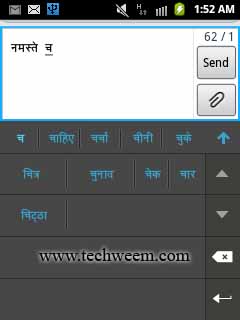
Google Hindi Input is a Hindi keyboard for android phone here we have used this application on Samsung galaxy y gt-s5360 running on gingerbread and it work perfectly. Google Hindi Input is an Indic IME which allows you to type messages, update on social networks or compose emails in Hindi on your Android phone. If you can read नमस्ते correctly on your phone, then you may install and use Google Hindi Input, otherwise your phone may not support Devanagari script. As Before Android 4.0, Google did not provide official Devanagari font support. Please make sure that your manufacturer provides additional Devanagari font in your phone.
Google Hindi Input for Samsung galaxy y android phone
Screenshots:
 Google Hindi Input for Samsung galaxy y android phone 
 Google Hindi Input for Samsung galaxy y android phone 
Download:
Hindi keyboard : Google Hindi Input v1.0.1.apk(direct)

OR

Hindi keyboard from: Google play

How to enable hindi input method/IME on my Android phone and set it as the default keyboard?

On Android 4.x and newer versions:
  • Install the apk
  • Open Settings -> Language & Input, under “KEYBOARD & INPUT METHODS” section, check Google Hindi Input, then click Default and select “Hindi transliteration” in the “Choose input method” dialog.
  • When typing in an input box, you can also change the default input method by selecting “Choose input method” in the Notification area.
On Android 2.x (using galaxy y):
  • Install the apk
  • Open Settings > locale and text > scroll down and in "Text setting", check "Google Hindi input". Now Again in "Text setting" click on select input method and a popup window appear and check "Google Hindi input" or 
  • When typing in an input box, long press in the box and select “Input method” in the popup menu, then select “Google Hindi Input”.
 हिंदी कुंजीपटल से टाइप कर्र एंड्राइड फोने पर।
Read More

Thursday, August 1, 2013

As we know Google is currently rolling out the update to Android 4.3 for the Nexus devices, along with that Google has also released several updates for some Google apps such as Google Play Movies, Google Play Music and Google Play Store. The latest version of the Google Play Store app for Android devices is now 4.2.9. Of course, the update will be rolled out to all supported Android smartphones and tablets but you can also install this new version of the Google Play Store v4.2.9. manually.

Screenshot galaxy y:

Latest Google Play Store 4.2.9 – APK Download 

 
Download:

Installation:
Download the APK file of the  Latest Play Store  v 4.2.9 and place on sd card.
Enable the installation of “installation of non-market application” in the application settings of your device.
Now install the app.

Read More

Monday, July 22, 2013

LINE is a new communication app which allows you to make FREE voice calls and send FREE messages whenever and wherever you want. LINE is a free cross-platform group messaging service.
 LINE for Samsung GT-S5360 Galaxy Y

Make Free Voice Calls from Samsung GT-S5360 Galaxy Y or android smartphone

  • All LINE smartphone users can enjoy free high quality voice calls, whenever and wherever you are.
  • Talk for as much as you want and best of all, it’s free!
Messages Delivered to you Quick
  • Instead of taking time to email/sms your friends, use LINE’s message function to send messages easily with colorful icons, photos and even location information.
  • Express yourself using stickers and emoji.
  • Send photos and voice messages with ease
  • Available for PCs and smart-tablets
Make it YOUR Social Network
  • Have fun with LINE’s ‘Home’ feature: Share your moments with all your friends using photos, videos, and location info.
  • Use ‘Timeline’ to see what your friends have been up to and what they have posted! Leave comments, messages and enjoy your communication.
we hope you enjoy LINE!


Download:

Google play: Download
Read More

Monday, June 3, 2013

Jelly Bean Keyboard - The keyboard from Android 4.1 Jelly Bean. This is the keyboard from Android 4.1 (codename Jelly Bean). Everything is working except Speech Recognition will require android 2.2 or higher. This essentially the same Jelly Bean Keyboard you will find in Android 4.1 but few minor adjustments has been make it work a little better. It's even better than the original Jelly Bean keyboard:
Features:
Learns from typing history, the more you type with this keyboard, the predictions will get faster and smarter!
Compatible with most android devices
Features that are incompatible with older phones were removed to make the keyboard faster


DOWNLOAD- LINK
Read More

Thursday, April 11, 2013


Google rolls out its latest version of Google Play Store 4.0.25 with completely new look, which is simpler and faster. The previous version of Google Play Store was 3.10.14 and now the new version is 4.0.25 for Android phones and tablets. Google Play Store 4.0.25 will work on Android 2.2 (Froyo) and above. The new redesigned Google Play store 4.0.25 have much better look. Similar content are grouped together by categories, with this new interface it really become easy to buy apps, movies, games and other contents on the Google Play Store for android phones and tablets. The screenshot below taken from galaxy y.
Google Play Store 4.0.25 Apk

Screenshots:
Latest version of Google Play Store 4.0.25 Apk for Android phones And tablets    

  Latest version of Google Play Store 4.0.25 Apk for Android phones And tablets  

Download:
This new version of Google Play Store App 4.0.25 will be soon available as official update. But if you want to get it immediately then you can download the latest version of Google Play Store 4.0.25 Apk and install it.


To receive latest update from us like our facebook page Techweem

Read More

Tuesday, April 2, 2013

Hi friends if you are a music lover and owner of an android phone or tablet then GoneMAD Music Player is a must have music player app for you. GoneMAD Music Player focuses on providing tons of features and options to allow for a personalized listening experience. With 150+ customizable options, you can listen to music the way you want to.

GoneMAD Music Player full v1.4.8 Apk
Features of GoneMAD Music Player full v1.4.8 Apk:
  • Supported audio formats: aac(mp4/m4a/m4b), mp3, ogg, wv, mpc, alac, flac, opus, tta, ape, wav, wma, adts(4.0+), and 3gp(4.0+)
  • Flawless gapless playback (mp3 and aac gapless supported on most devices)
  • ReplayGain support (track and album gain)
  • Cuesheet support (cue file and embedded cues)
  • Crossfade (auto and manual transitions)
  • Smart Playlists
  • Bookmarking
  • Song Ratings
  • High powered 2 to 10 band graphic equalizer with 3 quality settings
  • Preamp gain control
  • Left/Right audio balance control
  • 16 built-in EQ presets and the ability to create your own
  • DSP Limiter with adjustable attack/release to prevent distortion
  • Highly optimized media library, designed for large music libraries (50k+), that works with every supported format
  • Browse your collection by artist, album, song, genre, playlist, or folders
  • Built in file browser
  • Album artist and disc no tags supported
  • Tag editor (supports mass editing)
  • Search artists, album artists, albums, songs, and filenames
  • Save/Load playlists or create playlists on the fly
  • Supports m3u, pls and wpl playlist file formats
  • Edit playlists with an easy to use drag and drop interface
  • 2 Shuffle modes: Shuffle Queue and Shuffle Collection
  • Custom actions on queue completion
  • Automatically find and download album art
  • Manual art search
  • Embedded album art support
  • 10+ skins to choose from
  • Lockscreen player
  • ICS lockscreen control support
  • Notification controls (3.0+)
  • Scrobble support: (ScrobbleDroid and Simple LastFm Scrobbler)
  • Customizable Gesture System: 25 assignable actions to 7 different gestures
  • Customizable Now Playing View: 29 different tags to put into 6 slots
  • Customizable tab order
  • Auto resume playback when ending a phone call
  • Auto pause/play when unplugging/plugging in a headset or connect to bluetooth
  • Bluetooth headset controls
  • Automatically adjust volume when connecting/disconnect bluetooth audio or wired headsets
  • Comes with a 2×1, 2×2, 4×1, 4×2, and 4×4 widget (customizable opacity)
  • Tasker integration
  • Single button headset control support
  • Jump straight to playing album, artist, genre, or folder
Screenshots:
  
Download: APK 
Instructions:
  • Install the APK and enjoy music.
  • Galaxy S3 users should disable ‘auto haptic’ if playback is choppy (system settings -> sound)
  • CM10 or custom jelly bean rom users should disable opensl (prefs -> audio -> opensl) if gmmp crashes after each song. OpenSL is buggy in custom jellybean rom's.
Read More

Monday, March 4, 2013

Mozilla Firefox for Samsung Galaxy Y an Armv6 android devices. This nightly version of Mozilla Firefox is an official version that is meant to support almost all Armv6 android devices. The current build is fennec-22.0a1. As this is a nightly build so it may have some bugs and may be unstable. There are some great features included in it like sync, save pages as pdf, install add-ons, and lets not forget it also support flash player. Here i am going to add few screenshot of Mozilla Firefox nightly running on galaxy y.

Screenshots:
  Mozilla Firefox for Samsung Galaxy Y 


So now if you want to install Mozilla Firefox on galaxy y you can download from Mozilla site still for your connivance we will provide link.

Download and Requirement:
Samsung galaxy y or any ARMV6 android smart phone.
Mozilla Firefox ARMV6 APK:(not mirrored) fennec-22.0a1.multi.android-arm-armv6.apk
Size: 24 MB

Installation:
Just install the Apk and enjoy web.

How to enable Flash supports on Firefox for galaxy y
Now open your Mozilla Firefox tab on menu (left button)
Now from menu tab on more and select setting
Now you are on Settings screen, tap on Plugins and choose Tap to play or Enabled 

To receive latest update from us like our  facebook page Techweem
Read More

Saturday, December 22, 2012

Hi friends as we know that on any smartphone web browser is one of the must have application so that you can browse your favorite site but now here is a option for you to create your own web browser of your own custom style that look different from others and the most important thing is that you don't have to know coding for creating your own web browser so here we are going to provide you an step by step instruction on how to create your own web browser app with out knowing coding. Here we have created one for you can try it out
techween web browser free for your android phone and tablet

Download: Techween web browser v2.7.2.apk

Features:
  • Add your own custom Name for your browser.
  • Add your own custom browser icon.
  • Set default homepage of your choice.
  • Select a theme/skin of your choice from available more then 10.
  • Add your own custom splash screen.
Requirement:
  • A computer with active internet connection.
  • An android smart phone to install your browser

Steps to create your own customized browser for android
  • First of all create browser icon JPG or PNG, < 50KB, 72x72 pixels
  • Thee create splash screen PNG or JPG, <500KB, 480x800 pixels
  • To create your browser icon and splash screen you can use Photoshop or any other photo editing application of your choice.
  • Now open your browser and open this online application by Maxthon and click on make it now You will be taken to the next screen where you will have to Add Name, icon, home page, theme/skin, splash screen and your email address and click on create android browser.
  • This will take 2-3 minutes and your custom browser is ready for download  now download and install it.
Visual steps:
Create your own web browser free for your android phone and tablet
To receive latest update from us like our  facebook page Techween
Read More
Related Posts Plugin for WordPress, Blogger...
Google Google+