Showing posts with label Galaxy grand. Show all posts

Thursday, September 14, 2017

Hi friends as Samsung has launched its next note Samsung Galaxy Note 8 which can can be ordered online from Samsung site The current price of Galaxy Note 8 in Indian currency is Rs.67,900. So lets take look on some important specification of Galaxy Note 8.

image from Samsung site

Specification

Out of the box Galaxy Note 8 runs on Android Nougat 7.0. The phone is powered with 10nm Octa Core processor that have (Quad Core x 2.3 GHz + Quad Core x 1.7 GHz) Qualcomm MSM8998 Snapdragon 835 processor and Adreno 540 GPU. The Note 8 have 6 GB RAM and 64 GB internal Storage which can be expanded upto 256 GB with help of SD card. The screen size is 6.3 inches and it is Super AMOLED screen with Corning Gorilla Glass 5 with resolution of 1440 x 2960 pixels. Note 8 have 12MP dual camera 2x optical zoom at its rear side and an 8MP front-facing camera. The phone have hybrid slot for sim and sd card it is dual sim. The phone is powered with Non-removable Li-Ion 3300 mAh Battery

Other specification
Supports 4G volte, Fingerprint Sensor, Quick Charging, Iris Scanner, Water proof, NFC, Dust proof, USB Type-C 1.0, Infrared, Bluetooth v5.0, Wi-Fi, etc


Can get from here


Read More

Sunday, January 3, 2016

BusyBox Pro v32 Apk

BusyBox Pro The fastest, most trusted, and also most preferred BusyBox installer as well as uninstaller! Over 2 million installs! Victor of best Energy Software honor for Android via Handster. This is the ONLY Installer on the market that will permit you to get rid of Busybox (If sustained on your phone) In Addition To the just open sourced installer.


Root needed for this application
The fastest, most trusted, and # 1 BusyBox Pro 32 Apk Mod installer as well as uninstaller!
BusyBox is a software application that gives numerous common Unix tools, similar to the larger (but a lot more qualified) GNU Core Utilities. BusyBox Pro Apk is designed to be a low executable for usage with the Linux bit, makings it ideal for usage with embedded devices. It has actually been self-dubbed “The Pocket knife of Embedded Linux”.

Leave this installed if you constantly wish to get the most recent version of busybox

What’s New?
Updated to resolve system space issues
Added support for Chainfires systemless root.
Fixed custom path support.
Fixed space reporting issues.
Fixed a number of install issues

How to install?
Download the apk from given below link
Install and Open apk
Click on Install
Enjoy 

Download :  APK
Read More

Sunday, August 4, 2013

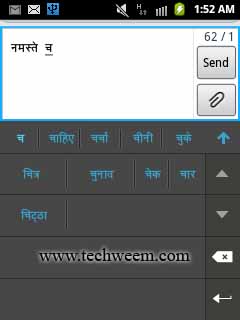
Google Hindi Input is a Hindi keyboard for android phone here we have used this application on Samsung galaxy y gt-s5360 running on gingerbread and it work perfectly. Google Hindi Input is an Indic IME which allows you to type messages, update on social networks or compose emails in Hindi on your Android phone. If you can read नमस्ते correctly on your phone, then you may install and use Google Hindi Input, otherwise your phone may not support Devanagari script. As Before Android 4.0, Google did not provide official Devanagari font support. Please make sure that your manufacturer provides additional Devanagari font in your phone.
Google Hindi Input for Samsung galaxy y android phone
Screenshots:
 Google Hindi Input for Samsung galaxy y android phone 
 Google Hindi Input for Samsung galaxy y android phone 
Download:
Hindi keyboard : Google Hindi Input v1.0.1.apk(direct)

OR

Hindi keyboard from: Google play

How to enable hindi input method/IME on my Android phone and set it as the default keyboard?

On Android 4.x and newer versions:
  • Install the apk
  • Open Settings -> Language & Input, under “KEYBOARD & INPUT METHODS” section, check Google Hindi Input, then click Default and select “Hindi transliteration” in the “Choose input method” dialog.
  • When typing in an input box, you can also change the default input method by selecting “Choose input method” in the Notification area.
On Android 2.x (using galaxy y):
  • Install the apk
  • Open Settings > locale and text > scroll down and in "Text setting", check "Google Hindi input". Now Again in "Text setting" click on select input method and a popup window appear and check "Google Hindi input" or 
  • When typing in an input box, long press in the box and select “Input method” in the popup menu, then select “Google Hindi Input”.
 हिंदी कुंजीपटल से टाइप कर्र एंड्राइड फोने पर।
Read More

Thursday, August 1, 2013

As we know Google is currently rolling out the update to Android 4.3 for the Nexus devices, along with that Google has also released several updates for some Google apps such as Google Play Movies, Google Play Music and Google Play Store. The latest version of the Google Play Store app for Android devices is now 4.2.9. Of course, the update will be rolled out to all supported Android smartphones and tablets but you can also install this new version of the Google Play Store v4.2.9. manually.

Screenshot galaxy y:

Latest Google Play Store 4.2.9 – APK Download 

 
Download:

Installation:
Download the APK file of the  Latest Play Store  v 4.2.9 and place on sd card.
Enable the installation of “installation of non-market application” in the application settings of your device.
Now install the app.

Read More

Wednesday, July 31, 2013

Hit the speed of heat in the newest, fastest, most visually stunning edition of the famed Asphalt series.A FIRST-CLASS LINEUP! Drive 60 different cars from the world’s most prestigious manufacturers, like Ferrari, Lamborghini and Aston Martin, including the legendary DeLorean.
Asphalt 7: Heat v 1.0.6 android game Apk+Data
RACE ACROSS THE GLOBE
  • Gear up to race on 15 tracks set in real cities around the world, including brand new tracks in Hawaii, Paris, London, Miami and Rio.
CHALLENGE THE WORLD
  • The completely revamped multiplayer lets you take on up to 5 of your friends locally or online. Keep track of who’s the best with the new Asphalt Tracker that lets you compare stats, show off achievements and challenge rivals. You can also find new online opponents with the matchmaking system. Practice hard, because there are special events that will pit you against the best in the world!
YOUR WAY OR THE HIGHWAY
  • Play however you please with 6 different game modes packed with 15 leagues and 150 different races.
CUTTING EDGE GRAPHICS
  • Every car and track is more beautiful than ever thanks to graphics that push the limits of your device.
A RECORD OF SUCCESS
  • Acclaimed by both media and players, the Asphalt franchise has already attracted several million players worldwide... Come and join the ride!
  • For fans of racing, driving simulation and multi player Android games.
Requirements to play Asphalt 7 heat
  • An Android phone
  • 1 GHz CPU
  • 512 MB RAM
  • Adreno 205 GPU, equivalent or better
  • 1.2 GB storage space
For optimal performance, we recommend closing other applications and restarting your device before playing Asphalt 7.

Downloads:

APK
Asphalt 7: Heat v 1.0.6 APK

          OR

Asphalt 7: Heat Modded Apk With Unlimited Money

DATA for armv7
Part 1(100 mb)- Download Part 1
Part 2(100 mb)- Download Part 2
Part 3(100 mb)- Download Part 3
Part 4(100 mb)- Download Part 4
Part 4(100 mb)- Download Part 5
Part 4(100 mb)- Download Part 6
Part 4(100 mb)- Download Part 7

Installation:
  • Install the apk.
  • Extract the data file using file manager and Copy it to  'com.gameloft.android.ANMP.GloftA7HM' folder to 'sdcard/Android/Obb/
Enjoy the game.
Read More

Friday, May 31, 2013

Frisbee(R) Forever v2.0.5 Ultimate Edition. Go wild in the worlds of Frisbee Forever. A fast-paced game with super crisp HD, 3D graphics.Get ready for blast-off. Fly at breathtaking speed across more than 100 crazy tracks. Twist and turn in the California Theme Park, climb the majestic mountains in the Wild West, send the waves blazing in the Pirate filled Caribbean oceans or prance through the snow in the new Winter wonderland. There’s a level for everyone. Frisbee(R) Forever from the developer of Subway Surfers.
Play with cool classic Wham-O® Frisbees or brand new discs only available in Frisbee® Forever. Collect more than 100 Frisbees, with plenty of trophies and secret bonuses to achieve.


Ultimate Edition Features:
  • Unlocked all levels + Worlds
  • Unlocked all Frisbees
  • Unlimited Money
Download free:

Frisbee(R) Forever v2.0.5 Apk

Google play: http://adf.ly/Ponhy

Read More

Wednesday, May 29, 2013

Fast & Furious 6: The Game APK + DATA v1.0.4 for android hvga. Step into the world of Fast & Furious 6. Earn cash and the respect of the “Fastest” drivers as you drift and drag through the London street scene. Join the Fast & Furious crew as they prepare to take on a series of jobs in an all new heist mode. Fast & Furious 6: The Game takes the mobile racing genre to greater heights with stunning graphics, new game modes, addictive challenges and intense full-throttle missions that dare you to exceed all limits.

 
Added Features:
Fixed issue on some devices downloading content
Addressed issues resuming the game when minimized
Fixed crash issue when sharing on FB on some devices
Resolved graphical corruption on some devices
Removed black screen on some devices when launching game
Better handling of minimizing and exiting the app

Download:
Fast & Furious 6: Fast & Furious 6 The Game v1.0.4.rar

Installation:
First of all extract the rar on pc or device with file manager.
Install the apk
Now copy 'com.kabam.ff6android' folder to 'sdcard/Android/obb.
After that Launch the game and play.

Google play: http://adf.ly/Pi35l

Note: Not for galaxy y and armv6

Read More

Tuesday, May 28, 2013

Hi friends today we are going to provide you with an instruction on how to install custom Rom GENNXT on Galaxy Grand GT-I9082 previously we have already provided you how to root and install cwm on Galaxy Grand GT-I9082. This Rom is shared on XDA by balliboxer so if you like the Rom dont forget to thanks him. So before we move to installation steps here are features and screenshots (by dev.) of GENNXT jellybean 4.1.2  custom ROM.

Screenshots:
GENNXT ROM For Samsung Galaxy Grand GT-I9082   
GENNXT ROM For Samsung Galaxy Grand GT-I9082    
Features:
  • Deodexed
  • Zipaligned
  • Rooted
  • Superuser (thanks to chainfire )
  • Busybox
  • Updated clockworkmod recovery 6.0.3.1 ( thanks to k2wl )
  • Cf-root 
  • init.d support
  • SMS 200 recipients, stop SMS to MMS auto-converting, increase SMS hour limit
  • Camera & Camcorder hacks: Adding "Shutter Sound On/Off" in menu, flash can be used in low battery
  • Note2 video player (with live thumbnails, have to wait for sometime to let video player to build thumbnails)
  • Note2 Motion Quick Glance 
  • S4 LockScreen Flare Effect (credits: koulis2000)
  • S4 icons
  • S4 weather widget ( Credits : Irft )
  • S4 contacts
  • S4 settings icons
  • Ink Effect Blue Colour For Now
  • Smart rotation new feature
  • Notification panel lock screen and recent apps
  • Pop Up Browser
  • Inbuilt Flash Player
  • Internal to external inbuilt settings
  • 4 way reboot menu
  • Multiwindow All Apps Support
  • LockScreen Rotation Support
  • Lockscreen shortcuts 5 from 3
  • Tw_launcher 5x5 home grid app grid
  • Bloatware removed many more
Warning:
Use at your own Risk! You will be responsible for whatever happens to your device and no one else.

Requirements:
A Rooted Samsung Galaxy grand Duos GT-i9082 with cwm.

Download:
Samsung Galaxy grand Duos Rom file:(not mirrored) I9082XXAMD6.zip
Size: 499.09 MB

Installation Instruction:
  • Back up your system and charge phones battery full
  • Download Rom form the download section of this post and place in root directory of your sd card.
  • You must have ClockworkMode Recovery pre-installed. Reboot your phone in cwm recovery by pressing volume up+ menu + power .
  • Now you will have to do all wipe ("wipe data/factory reset" and"wipe cache partition").
  • After that select "install zip from sd card" and then "choose zip from sd card";
  • Navigate to root directory and select the rom file "I9082XXAMD6.zip" and ok Let the process be completed successfully.
  • After process completes Select: "reboot system now";
  • First boot may take long time (up to 10 minutes).
  • Reboot Phone And Enjoy latest GENNXT ROM on Samsung Galaxy Grand duos.
Congratulation! you have Successfully learn how to install GENNXTcustom Rom on Samsung Galaxy Grand duos GT-I9082 If you notice any bug post on thread page to get fixed by developer.
To receive latest update from us like our  facebook page Techweem
Read More

Tuesday, April 30, 2013

Now enjoy the Official Game Iron Man 3 on your Android devices. The Official Game Iron Man 3 v1.0.1 from the upcoming Marvel movie is a free-to-play game. Become billionaire Tony Stark as Iron Man in this free, fast-paced, endless runner, the official game of the upcoming movie Iron Man 3.After the events of Iron Man 3, Tony has become a peacekeeper, but new threats emerge regularly all around the globe and Iron Man is the only one who can take care of them. Get ready for intense action in this addictive, endless 3D runner game. As this is free to play game but to enrich your experience you may purchase game items to boost your progress.
Iron Man 3 v1.0.0 Apk + Data the Official Android Game
Screenshot:
Iron Man 3 v1.0.0  Iron Man 3 v1.0.0 Apk + Data
Features:
  • Fight against rising A.I.M. forces around the world during amazing runs
  • Discover 3 different locations offering endless, self-generating levels: Malibu Shores, New York City and China
  • Confront 4 epic villains from the Iron Man comics: Crimson Dynamo, Ezekiel Stane, Living Laser and the mighty M.O.D.O.K.
  • Complete various missions in fast-paced flying battles and epic one-on-one confrontations
  • Unleash Iron Man's superpowers with amazingly responsive swipe controls
  • Enjoy an outstanding 3D world with cutting-edge graphics and animations
  • Research and develop up to 18 suits from the different movies (MARK II, MARK 42, Silver Centurion, etc.)
  • Upgrade your armours and powers in the research Lab to wipe out your enemies
Download:
Iron Man 3 v1.0.0 Apk + Data (ARMV7, HVGA, WVGA)

Iron Man 3 Apk
OR
Google play: http://adf.ly/O3l0q

And

Iron Man 3  Data part I
Iron Man 3  Data part II
Iron Man 3  Data part III

Instructions:
  • Works on Non-Root and Offline
  • First of all install the APK file.
  • Now extract all the three parts of the data file and copy the extracted folder 'com.gameloft.android.ANMP.GloftIMHM' to 'sdcard/Android/obb'
  • Now launch the Game (No internet connection required)
Enjoy Iron Man 3 on your Android devices.
Read More

Friday, April 19, 2013

Hi friends here is a mod version of Subway Surfers for galaxy y an armv6 android phone it. As we know that Subway Surfers is one of the popular game and now we can play it on galaxy y with no lag. This is version1.6.0 modded apk so that it can run on galaxy y and other Armv6 QVGA Android devices. This modded version of Subway Surfers 1.6.0 is shared on XDA by Drago9oiD. so it time to DASH as fast as you can. DODGE the oncoming trains and help Jake, Tricky & Fresh escape from the grumpy Inspector and his dog.
Subway Surfers for galaxy y an armv6 android phone
Screenshot:
Subway Surfers for galaxy y Subway Surfers for armv6 android phone Subway Surfers for android phone Subway Surfers for QVGA Android phone
Features:
  • Grind trains with your cool crew
  • Colorful and vivid HD graphics
  • Hoverboard Surfing
  • Paint powered jetpack
  • Lightning fast swipe acrobatics
  • Challenge and help your friends
Download:
Subway Surfers for galaxy y: Subway_Surfers_v1.6.0-ARMV6.apk [QVGA]

Installation:
Simply install the Apk and run the game.

We have tested it on stock ROM and kernel without any additional tweaks it runs smoothly without lag. Hope it will work even better if used with chainfire 3d etc.
Read More
Temple Run: Oz game for android devices.This is brand-new endless runner inspired by Temple Run 2 and the film Oz the Great and Powerful. Play as Oz and outrun the shrieking flying baboons as you turn, jump and slide your way across the land. Begin your exhilarating adventure now and see how far you can run!
New Temple Run OZ for android devices
Screenshots:

New Temple Run OZ for android devices galaxy y New Temple Run OZ for android devices galaxy s New Temple Run OZ for android devices New Temple Run OZ apk free for android devices 
FEATURES:
  • Stunning environments inspired by the film – explore them all.
  • Fly in a hot air balloon – earn even more coins.
  • Explore different locations in Oz – follow sign posts
  • The environment changes as you run – test your reflexes.
  • Compete in weekly challenges – beat your friends

Download:
Temple Run OZ Apk [QVGA, WVGA, HVGA] ARMV7

GOOGLE PLAY: http://adf.ly/NDXxa

Install the apk enjoy the game
Read More

Tuesday, April 2, 2013

Hi friends if you are a music lover and owner of an android phone or tablet then GoneMAD Music Player is a must have music player app for you. GoneMAD Music Player focuses on providing tons of features and options to allow for a personalized listening experience. With 150+ customizable options, you can listen to music the way you want to.

GoneMAD Music Player full v1.4.8 Apk
Features of GoneMAD Music Player full v1.4.8 Apk:
  • Supported audio formats: aac(mp4/m4a/m4b), mp3, ogg, wv, mpc, alac, flac, opus, tta, ape, wav, wma, adts(4.0+), and 3gp(4.0+)
  • Flawless gapless playback (mp3 and aac gapless supported on most devices)
  • ReplayGain support (track and album gain)
  • Cuesheet support (cue file and embedded cues)
  • Crossfade (auto and manual transitions)
  • Smart Playlists
  • Bookmarking
  • Song Ratings
  • High powered 2 to 10 band graphic equalizer with 3 quality settings
  • Preamp gain control
  • Left/Right audio balance control
  • 16 built-in EQ presets and the ability to create your own
  • DSP Limiter with adjustable attack/release to prevent distortion
  • Highly optimized media library, designed for large music libraries (50k+), that works with every supported format
  • Browse your collection by artist, album, song, genre, playlist, or folders
  • Built in file browser
  • Album artist and disc no tags supported
  • Tag editor (supports mass editing)
  • Search artists, album artists, albums, songs, and filenames
  • Save/Load playlists or create playlists on the fly
  • Supports m3u, pls and wpl playlist file formats
  • Edit playlists with an easy to use drag and drop interface
  • 2 Shuffle modes: Shuffle Queue and Shuffle Collection
  • Custom actions on queue completion
  • Automatically find and download album art
  • Manual art search
  • Embedded album art support
  • 10+ skins to choose from
  • Lockscreen player
  • ICS lockscreen control support
  • Notification controls (3.0+)
  • Scrobble support: (ScrobbleDroid and Simple LastFm Scrobbler)
  • Customizable Gesture System: 25 assignable actions to 7 different gestures
  • Customizable Now Playing View: 29 different tags to put into 6 slots
  • Customizable tab order
  • Auto resume playback when ending a phone call
  • Auto pause/play when unplugging/plugging in a headset or connect to bluetooth
  • Bluetooth headset controls
  • Automatically adjust volume when connecting/disconnect bluetooth audio or wired headsets
  • Comes with a 2×1, 2×2, 4×1, 4×2, and 4×4 widget (customizable opacity)
  • Tasker integration
  • Single button headset control support
  • Jump straight to playing album, artist, genre, or folder
Screenshots:
  
Download: APK 
Instructions:
  • Install the APK and enjoy music.
  • Galaxy S3 users should disable ‘auto haptic’ if playback is choppy (system settings -> sound)
  • CM10 or custom jelly bean rom users should disable opensl (prefs -> audio -> opensl) if gmmp crashes after each song. OpenSL is buggy in custom jellybean rom's.
Read More

Tuesday, March 12, 2013

Samsung galaxy grand Duos GT-i9082 is recently lunched and as the name indicates it is a dual sim phone. The phone is powered with 1.2GHz Dual Core processor and runs on the latest version of Google phone operating system Android jellybean v4.1.2. The screen resolution of grand duos is 480 x 800 (WVGA). So now lets forget about specification and proceed to our main topic that is rooting and install clockworkmod Recovery on Samsung galaxy grand Duos GT-i9082. So let me tell you that this rooting package is shared on XDA by senior member chotu222 so don't forget to thanks him for his hard work. So follow the instruction carefully to Root Galaxy grand Duos GT-i9082 and install clockworkmod Recovery successfully.
Root Galaxy grand Duos GT-i9082 and install clockworkmod Recovery

Warning:
If you are new to Android and want to Root your device must read this article before proceeding to know what are advantages and Disadvantages of rooting android device. Rooting the device will void the manufacturer's warranty. So use at your own Risk! You will be responsible for whatever happens to your device and no one else.

Requirements:

A Samsung Galaxy grand Duos GT-i9082.
A computer running on windows xp or above with proper driver installed to connect your Galaxy grand Duos to PC via USB cable.( can get it here)
Samsung Android ADB Interface Driver v2.9.507.0( get it here)

Download:

Installation Instruction:
  • First of all i hope you have installed required driver on pc and downloaded the all the files required to root and install CWM.
  • Next extract the cwm file "CWM-touch_i9082_chotu.tar.zip"using any file extracting application like winzip or winrar.
  • After extracting you will get a file "CWM-touch_i9082_chotu.tar.md5".
  • Place the rooting file SuperSU-v1.25.zip in root directory of your external sd card.
  • Now you have to power off your smartphone so that you can enter in download mode.
  • Now to boot your phone in Downloading mode press Volume Down + Home + Power button together until you see the warning screen on your device. To make it easy we have added a video below.
  • A warning will appear on your device. Now Press Volume Up to continue to the downloading mode. You should see a screen with "Downloading...." written on it. 
  • Now connect your phone to PC via USB cable. 
  • On the pc extract the odin" Odin3_v3.04.zip"using file extractor and open Odin3 v3.04.exe. 
  • ODIN should detect your smartphone on any of the COM ports and if successfully detected it will be highlighted by light blue box if not install the driver again. As shown in the pic below.

  • You will be seeing various boxes: some checked and some unchecked by default you will have to check the box listed below and rest should be unchecked. 
  1. Auto Reboot checked. 
  2. F. Reset Time checked. 
  3. PDA checked. 
  4. All other boxes should be unchecked.
  • Now click on PDA button under the Files (Download) section in ODIN and navigate to the folder where we have extracted cwm file and select CWM-touch_i9082_chotu.tar.md5 file and click on open. 
  • OK now click on start in ODIN and let the ODIN complete the flashing process. Don't interrupt the process the green box in Odin window shows "Pass", and now your phone will be reboot. 
  • When the phone reboots, a vibration will signify that the phone has shut down completely remove the battery. You can now disconnect your phone from the pc. 
  • As you have already copied SuperSU-v1.25.zip to your phone's external sd card. 
  • Now place the batteryand boot into clockworkmod recovery by pressing Volume Up + Home + Power button together till the Samsung logo appears followed by the CWM Recovery screen. 
  • In the CWM menu Scroll down to Backup & Restore and select backup. Let the backup process complete. Make sure you have enough free space to performing the backup say approx 500 MB.
  • After completing backup go to Install Zip from sdcard option and select Choose zip from external sdcard
  • Finally select the SuperSU-v1.25.zip and select the "Yes" option to root your device. Once the process get completed Reboot your phone.
Congratulation Now you have gained superuser right on your Galaxy grand Duos GT-i9082 so now you can install custom ROM on your Samsung Galaxygrand Duos GT-i9082 and apps that require root access. So if you have any problem in installation can post on thread page ,or can post in comments below.

To receive latest update from us like our  facebook page Techween
Read More
Related Posts Plugin for WordPress, Blogger...
Google Google+